
วันนี้ เอา widget เสริม datepicker ใน jqueryui มาฝาก เป็นตัว widget ที่สร้างขึ้นมาใหม่
ปรับปรุงจาก plugin ตัวเดิมที่เคยแนะนำไปในบทความ
(บทความเนื้อหาเก่า)
สร้าง jquery plugin แสดง ปฏิทิน วัน เดือน พ.ศ. ภาษาไทย สำหรับ datepicker
https://www.ninenik.com/content.php?arti_id=469 via @ninenik
รูปประกอบ datepicker_thai widget
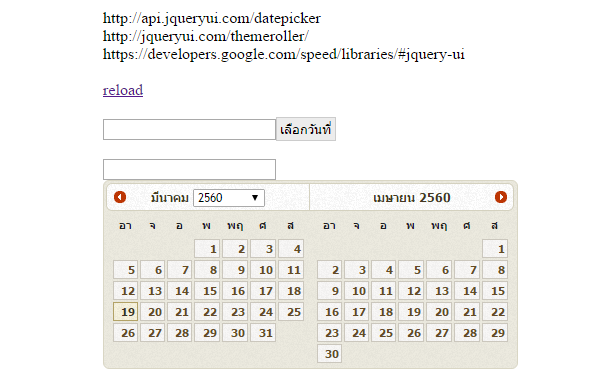
ดูตัวอย่างได้ท้ายบทความ
ก่อนอื่นให้ทำการดาวน์โหลดไฟล์ jqueryui_datepicker_thai_min.js
ได้ที่ลิ้งค๋ด้านล่างนี้
ดาวน์โหลด https://goo.gl/T8RJlE
ในไฟล์ดาวน์โหลดจะมีไฟล์ jqueryui_datepicker_thai_min.js และไฟล์ตัวอย่าง
demo_datepickerui.php อยู่ด้านใน
widget ตัวนี้ใช้ชื่อว่า datepicker_thai
จะมีการเรียกใช้งาน datepicker ของ jqueryui อีกที ดังนั้น การตั้งค่าก็จะยังคง
ใช้รูปแบบเดิม ซึ่สามารถดูรายละเอียดการตั้งค่าเพิ่มเติม ถ้าต้องการได้ที่
หรือถ้าต้องการดาวน์โหลด หรือสร้าง theme เอง ก็สามารถเข้าไปสร้าง
และโหลดลงมาใช้ได้ที่
สิ่งที่เพิ่มเข้ามาจะมีอยู่สองอย่างก็ การกำหนด
langTh และ yearTh
ตัวอย่างโค้ดการเรียกใช้งาน
	$("#dateInput2").datepicker_thai({
		dateFormat: 'dd/mm/yy',
        changeMonth: false,
        changeYear: true,
		numberOfMonths: 2,
		langTh:true,
		yearTh:true,
	});
ตัาอย่างโค้ดไฟล์ demo_datepickerui.php
<!DOCTYPE html>
<html lang="en">
  <head>
    <meta charset="utf-8">
    <meta http-equiv="X-UA-Compatible" content="IE=edge">
    <meta name="viewport" content="width=device-width, initial-scale=1">
	<title>Document</title>
	<?php
    $jquery_ui_v="1.8.5";
    $theme=array("0"=>"base","1"=>"black-tie","2"=>"blitzer","3"=>"cupertino","4"=>"dark-hive","5"=>"dot-luv",
		"6"=>"eggplant", "7"=>"excite-bike","8"=>"flick","9"=>"hot-sneaks","10"=>"humanity","11"=>"le-frog",
		"12"=>"mint-choc","13"=>"overcast","14"=>"pepper-grinder","15"=>"redmond","16"=>"smoothness",
		"17"=>"south-street","18"=>"start","19"=>"sunny","20"=>"swanky-purse","21"=>"trontastic","22"=>"ui-darkness",
		"23"=>"ui-lightness","24"=>"vader");
    $jquery_ui_theme=$theme[14];
    ?>
    <link type="text/css" rel="stylesheet"
     href="http://ajax.googleapis.com/ajax/libs/jqueryui/<?=$jquery_ui_v?>/themes/<?=$jquery_ui_theme?>/jquery-ui.css" />
    <style type="text/css">
    /* Overide css code กำหนดความกว้างของปฏิทินและอื่นๆ */
	#ui-datepicker-div {display: none;}
    .ui-datepicker{
        width:220px;
        font-family:tahoma;
        font-size:12px;
        text-align:center;
    }
/*	css กำหนดปุ่ม ถ้ามีแสดง*/
	.ui-datepicker-trigger{
		border: 1px solid #cccccc;
		background: #ececec !important;
		padding:3px;
	}
    </style>
</head>
<body>

<br>
<br>
<br>
<br>
<br>
<br>

<div class="container" style="margin:auto;width:500px;">

http://api.jqueryui.com/datepicker<br>
http://jqueryui.com/themeroller/<br>
https://developers.google.com/speed/libraries/#jquery-ui<br>
<br>
<a href="demo_datepickerui.php">reload</a><br>
<br>
      <input name="dateInput" type="text" id="dateInput" value="" readonly />
      <input type="hidden" name="h_dateinput" value="" id="h_dateinput">
<br>
<br>
      <input name="dateInput2" type="text" id="dateInput2" value="" readonly />
<br>
<br>
<div id="inline_date"></div>
</div>


<script src="https://ajax.googleapis.com/ajax/libs/jquery/1.12.4/jquery.min.js"></script>
<script src="https://ajax.googleapis.com/ajax/libs/jqueryui/1.12.1/jquery-ui.min.js"></script>
<script src="jqueryui_datepicker_thai_min.js?1"></script>
<script type="text/javascript">
$(function(){

	$("#dateInput").datepicker_thai({
		dateFormat: 'dd-mm-yy',
		showOn: 'button',
		buttonText: "เลือกวันที่",
		buttonImage: "", // ใส่ path รุป
		buttonImageOnly: false,
		currentText: "วันนี้",
		closeText: "ปิด",
		showButtonPanel: true,
		showOn: "both",
		altField:"#h_dateinput",
		altFormat: "yy-mm-dd",
		langTh:true,
		yearTh:true,
		numberOfMonths: 3,
	});


	$("#dateInput2").datepicker_thai({
		dateFormat: 'dd/mm/yy',
        changeMonth: false,
        changeYear: true,
		numberOfMonths: 2,
		langTh:true,
		yearTh:true,
	});

	$("#inline_date").datepicker_thai({
		dateFormat: 'dd-mm-yy',
		changeMonth: true,
		changeYear: true,
		langTh:true,
        yearTh: true,
	});


});
</script>
</body>
</html>
